
ZIP-to-state tags are tags that Ringba adds to your calls automatically. This feature uses the caller's ZIP Code to derive a tag with the caller's state, based on the state in which the ZIP Code exists. This feature also adds a tag to say whether the ZIP Code value is valid.
ZIP-to-state tagging works automatically with compatible ZIP Code tags and enriches your calls so you can route or review call traffic by state. Deriving the state from the ZIP Code is more reliable than deriving it from the area code or other data.
ZIP-to-state tagging works only for callers in the United States. Any user with permission to view reporting tags can also view the automatic state tags. ZIP-to-state tagging is included in all Ringba subscription plans: Business, Professional, and Enterprise.
This article contains the following sections:
- ZIP-to-State Tagging
- Creating Compatible ZIP Code Tag Names
- How to Find the Derived State Tags in Reporting
- Using the ZIP-to-State Tags in Filters
- Sending ZIP-to-State Tags
- ZIP-to-State Tagging FAQ
ZIP-to-State Tagging
Ringba automatically creates and adds a tag with the caller's state whenever you receive ZIP Code information from one of the following sources:
- Instant Caller Profile (ICP)
- Number Pools
- Gather node in your call flow
- Real Time Bidding (RTB)
- Inbound Data Enrichment (IDE)
You can find the automatic state tags alongside your other call tags in the Reporting screen. Derived tags appear in the Lookup category.
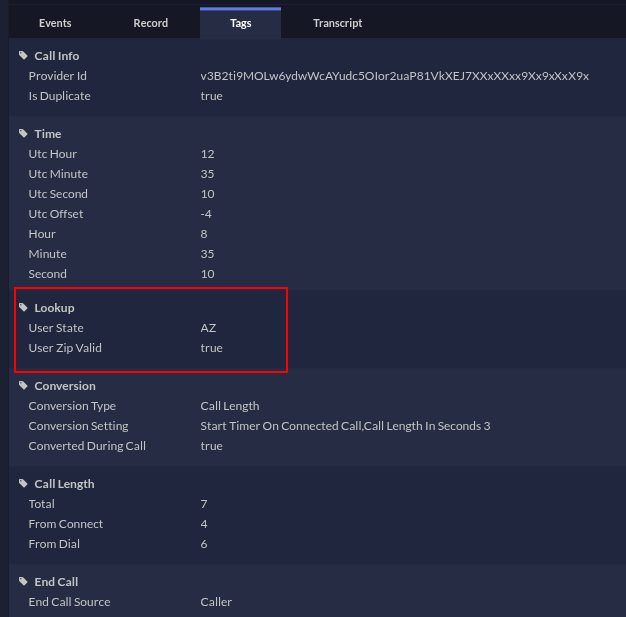
In addition to the derived state tag, Ringba also adds a tag to indicate whether the value in the ZIP Code field is valid. This field contains true if the ZIP Code is valid, and false if it is not. If the ZIP Code tag contains an invalid value, the derived tag is empty.
The tag names depend on the source of the ZIP Code:
| If the ZIP Code came from this source: | The derived state tag name is this: | The validation tag name is this: |
|---|---|---|
| ICP | Lookup: ICP State | Lookup: ICP Zip Valid |
| Number Pool | Lookup: Geo State | Lookup: Geo Zip Valid |
| Gather node | Lookup: Gather State | Lookup: Gather Zip Valid |
| RTB or IDE | Lookup: User State | Lookup: User Zip Valid |
Creating Compatible ZIP Code Tag Names
ZIP-to-state tagging looks for certain tag names to know which tag values to translate into states. Some methods for receiving a ZIP Code tag are pre-defined, so you don't have to worry about naming the tag. If you are receiving the ZIP Code through ICP or Number Pools, you can skip this section.
However, if you collect the ZIP Code through a gather node or from a publisher through an RTB URL or IDE URL, then you should define your ZIP Code tag to use one of the following names:
- zip
- zipcode
- zip_code
- zip-code
When Ringba identifies any of those tag names, the ZIP-to-state function automatically derives and adds a state tag to the call.
How to Find the Derived State Tags in Reporting
Use the following steps to see the derived state tags for a call in your Reporting screen:
- Navigate to Reporting > Default and scroll to the Call Details report.
- Click the arrow on the left side of the call to expand it.
Tip: You can use the filter tools at the top of the Reporting screen to help find the call you want to review. - Click the Tags tab.
- Scroll to the Lookup category.
Using the ZIP-to-State Tags in Filters
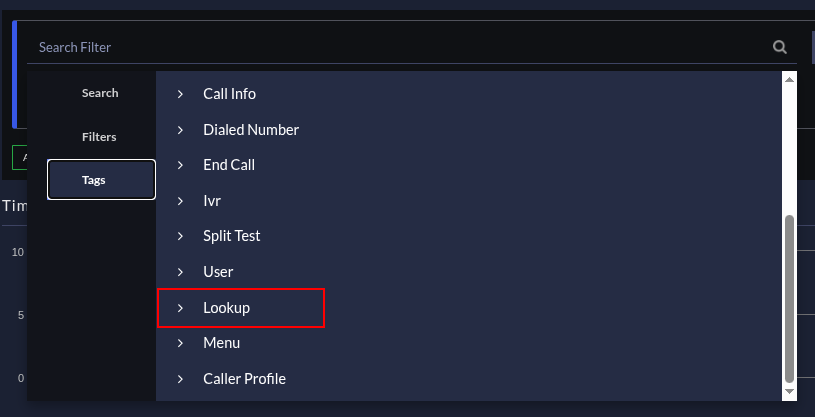
You can use both the derived state tag and the validation tag to filter your Reporting screen or define tag routing filters. Create the filter as usual and look for the tags in the Lookup category.
Sending ZIP-to-State Tags
You can send ZIP-to-state tags in your pixels or ring tree target URLs, just like you send any other tag. The following list contains the tokens for each tag:
| Source Derived From | Derived State Tag Token | Validation Tag Token |
|---|---|---|
| Instant Caller Profile | [tag:Lookup:icpState] |
[tag:Lookup:icpZipValid] |
| Number Pool | [tag:Lookup:geoState] |
[tag:Lookup:geoZipValid] |
| Gather node | [tag:Lookup:gatherState] |
[tag:Lookup:gatherZipValid] |
| RTB or IDE | [tag:Lookup:userState] |
[tag:Lookup:userZipValid] |
Tip: You can also use the Token button to insert the token for the tag you want.
You can instruct Ringba to consider multiple tags and put them in order by your priority. For example, to use all the derived state tags in your URL, you would include the following syntax:
[Lookup:icpState|Lookup:geoState|Lookup:gatherState|Lookup:userState]If you use this syntax, Ringba first checks the Lookup:icpState tag for a value and, if it has one, includes it in the URL. If Lookup:icpState does not have a value, Ringba checks the next tag, Lookup:geoState. If it has a value, Ringba uses it; otherwise, it continues to the next tag in the list.
You can rearrange the tags to define which tag you want Ringba to check first, and you can include other tags that might include the state.
ZIP-to-State Tagging FAQ
What if a call gets ZIP Codes from multiple sources?
Since the derived tags all have different tag names based on the source, the call can contain multiple tags with the derived state. When you need to use the information in these tags, you can define which tags Ringba should prioritize using over others. See How does Ringba prioritize multiple tags? for full information.
What should I do if I need help?
If you have any questions or need additional help, please reach out to our support team via chat or email at support@ringba.com.