
You can use the procedures in this article to start your investigation if you're having trouble with your ring tree (RT) or ring tree targets (RTT). This article contains suggestions for researching the most common issues.
This article contains the following sections:
General Configuration Check
First, you should verify the RTT settings by navigating to Ring Trees > Ring Tree Targets and opening the RTT. Check the settings described in the following sections to make sure they're configured correctly.
Dynamic Number and Confirmation Request
Check these general settings:
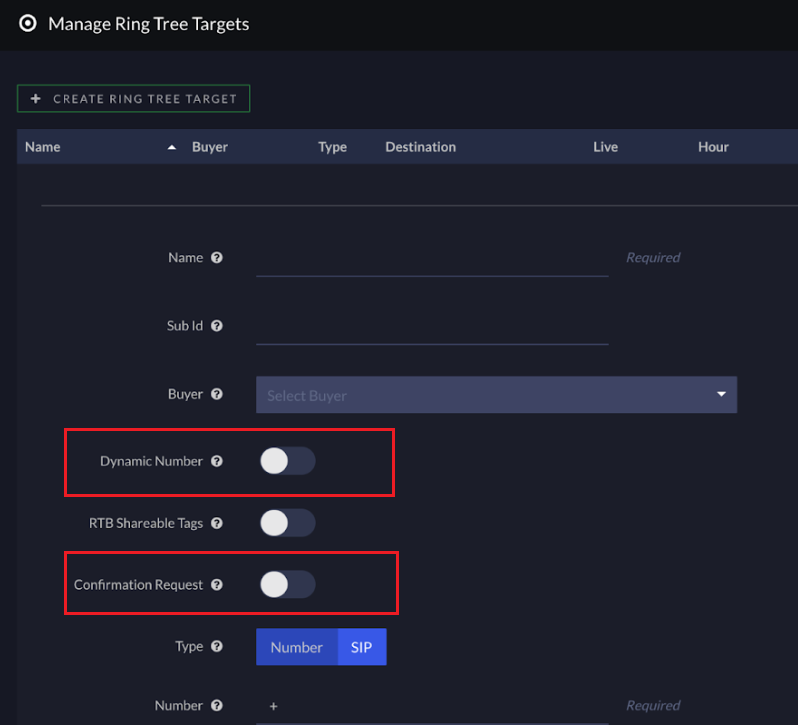
- Dynamic Number: If the RTT has the Dynamic Number switch toggled on, make sure the ping response contains the dynamic number. If you're not using a dynamic number, make sure this switch is toggled off.
-
Confirmation Request: If you don't want a two-step RTT, make sure this switch is toggled off.
Note: If you're not sure, see What is the difference between a one-step and two-step Ring Tree Target? to help understand the difference.
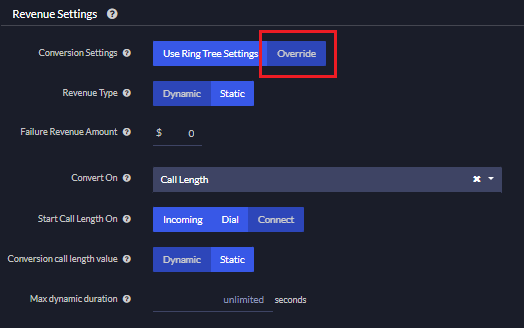
Revenue Settings Section
If you do not set the RTT to override revenue settings, Ringba defaults to using the RT revenue settings. If you want to control these settings at the RTT level, make sure to select Override here.
Request Settings Section
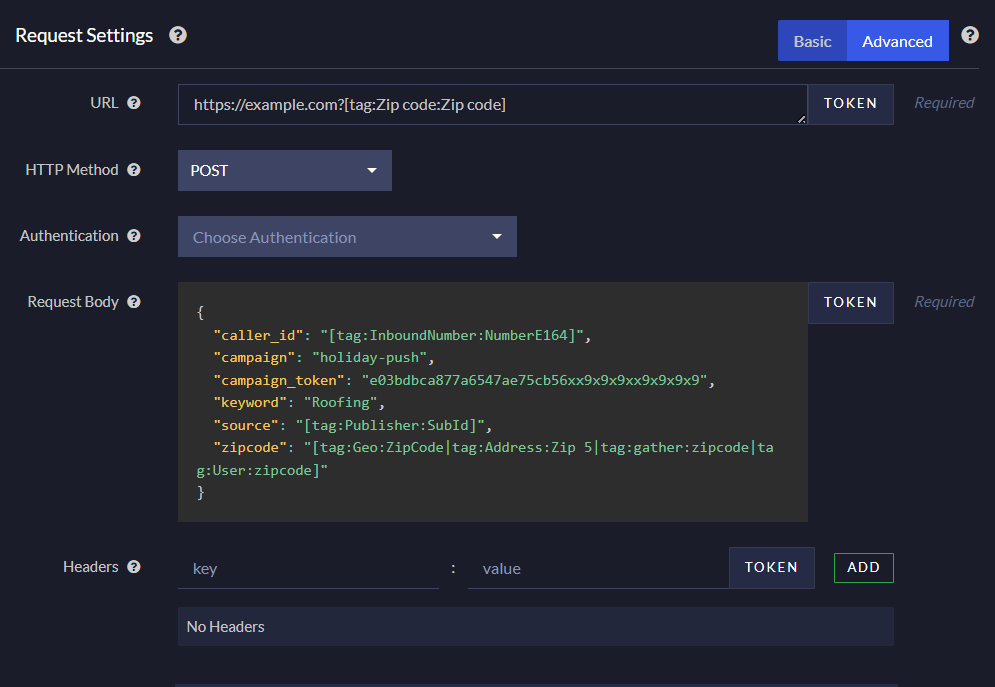
Check the URL field and the Request Body field to make sure you're using the correct syntax for your tokens. You do not need to escape any characters, but incorrect syntax can lead to unexpected results.
A properly formatted token looks like this:
[tag:User:zipcode]Every token has these attributes:
- Surrounded by square brackets [ ]
- Inside the brackets, it starts with tag:
- Followed by the tag category name, such as User:
- Followed by the tag name, such as zipcode
Tip: Use the Token button to let Ringba insert the properly formatted token for you.
If a token value can come from multiple tags, you can separate the tag names with the pipe character |. For example:
[tag:Geo:ZipCode|tag:Address:ZIP 5|tag:gather:zipcode|tag:User:zipcode]In this example, Ringba first checks the ZipCode tag in the Geo category for a ZIP Code value. If that tag is empty, it proceeds to the next option, ZIP 5 tag in the Address category. It continues through the list of possible ZIP Code sources until it finds a value or gets to the end of the list and has to leave the tag empty.
Tracking Down Problems
The Call Details report has a lot of information about the progress of your calls through Ringba that you can use to start a deep-dive investigation into a call.
Events Tab
You can find the Events tab by expanding the call in the Call Details Report:
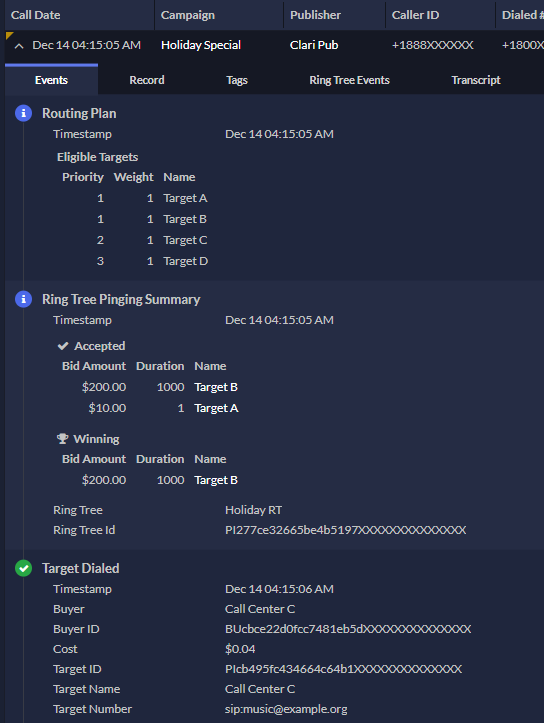
If a bid is rejected, the Ring Tree Pinging Summary event shows a Reason value of Call Acceptance Parsing Rejection.
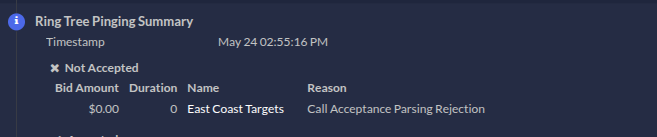
To investigate why the bid was rejected, open the RTT and check the Call Acceptance Parsing section.
Ring Tree Events Tab
The Events tab shows the RTT with the winning bid in the ring tree, and if there is a rejection, the Events tab also shows that. But the Ring Tree Events tab shows the API request and response with details. Check this tab to review the API request for problems.
Specific Problems
This section contains ideas for addressing specific problems you might be having.
Calls aren't going to a specific target
Make sure the ring tree target hasn't reached its cap settings.
Calls rejected due to missing information
Your buyer requires data about the caller to decide whether they want to accept the call. If you're regularly missing out on a buyer accepting a call because you don't have the information they require, try setting up a call flow and adding a gather node that asks the caller for the information you need.
Alternatively, you can use Instant Caller Profile (ICP) to collect information about the caller in real-time. You can even use ICP together with the gather node. Try setting up your call flow to go to a profile node if the gather node fails.
Bids not parsed correctly
If calls are being rejected or the bid is not being parsed correctly, then you should make sure that the parsing logic in each section can adequately process the responses from the buyer. If you are using any sorting logic when getting multiple results/bids, then make sure it is consistent across each parsing section. Using different sorting logic can lead to results being mixed up.
Troubleshooting Ring Tree Targets FAQ
What should I do if I need help troubleshooting my RTT?
If you have any questions or need additional help, please reach out to our support team via chat or email at support@ringba.com.