
Pinging your buyer too much can cost your buyer money and damage your relationship with them. Caching your ring tree target pings reduces repeat pings to your buyers. When caching is on for a ring tree target (RTT), Ringba saves the buyer's response to a ping for a few seconds. If the same caller triggers another ping to that target during that time, Ringba reuses the saved response instead of pinging the buyer again. As a result, a buyer receives at most one ping per caller, or per caller and ZIP Code, within the time window you set.
You turn caching on or off, choose how Ringba decides that two pings are for the same caller, and set the time window for each ring tree target from the Advanced Settings screen.
This feature is available to admin users. It is available in the following Ringba subscription plans: Professional and Enterprise.
This article contains the following sections:
Advanced Settings Screen
You navigate to the Advanced Settings screen by clicking Ring Trees > Advanced Settings. A table appears with a row for each ring tree target in your account, no matter which ring tree or campaign uses it. You can control which columns appear in the table by clicking the gear icon to the right of the search. You can use the search field to search any value in the table.
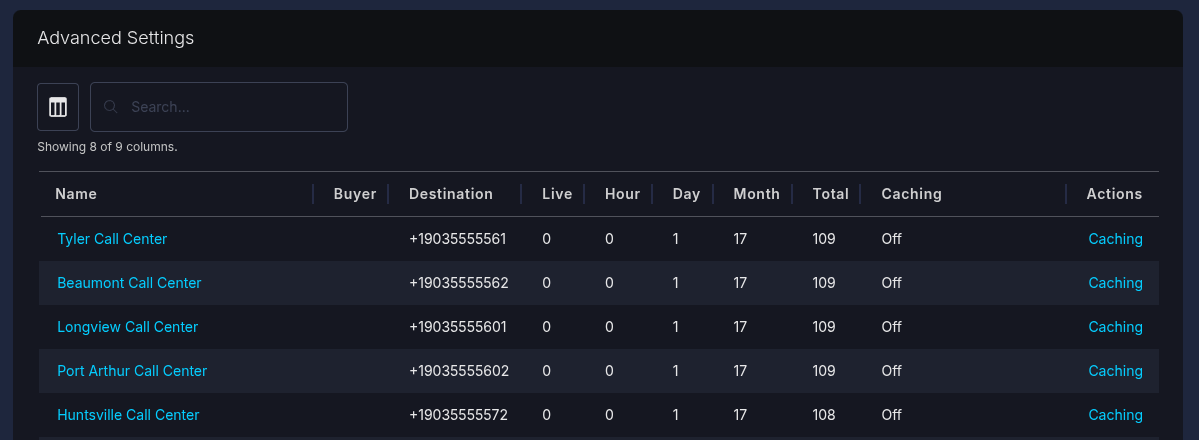
The table contains the following columns:
- Name: The name of the ring tree target. Click the name to open the target's edit screen.
- Buyer: The buyer assigned to the ring tree target. This column is empty if no buyer is assigned.
- Destination: Where Ringba sends calls for the target: a number, a SIP address, or Dynamic.
- Live: The number of calls connected to this RTT at the moment you loaded the report.
- Hour: The number of calls that have connected to this RTT in the last hour, as of the time you loaded this report.
- Month: The number of calls that have connected to this RTT in the current month.
- Total: The total number of calls that have ever connected to this RTT.
- Caching: Indicates whether you have enabled caching for this RTT.
- Request URL: The URL Ringba sends the ping request to. This column is hidden by default, but you can enable it by clicking the table icon to the left of the Search bar.
- Actions: Click Caching to open the Caching drawer, where you turn ping caching on or off for the target and choose its settings.
How to Configure Ping Caching for a Ring Tree Target
Use the following steps to configure ping caching for a ring tree target:
- Navigate to Ring Trees > Advanced Settings.
- Find the ring tree target. You can use the search field to find it by name, buyer, or any other value in the table.
-
Click Caching in the Actions column for the target.
The Caching drawer opens.
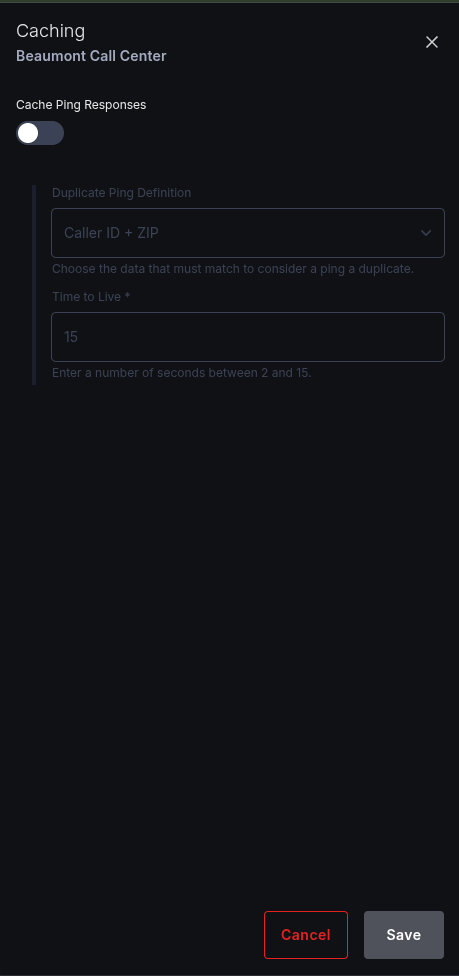
- Toggle on the Cache Ping Responses switch.
-
Select an option from the Duplicate Ping Definition field to indicates how Ringba decides that two pings are for the same caller: You can choose any one of the following options:
- Caller ID only
- Caller ID + ZIP
- Caller ID + tags. See Understanding How Ringba Identifies Repeat Callers for the differences.
- Enter a value in the Time to Live field to indicate the number of seconds Ringba keeps a saved response. You can enter any value from 2 to 15.
- Click Save.
To turn caching off, repeat steps 1 through 3, turn caching off, and save.
Caching settings belong to each ring tree target. When you clone a ring tree target, the clone gets the same caching settings.
Understanding How Ringba Caches Pings
When caching is on for a ring tree target, Ringba checks its saved responses before it pings the buyer for a bid.
If Ringba has a saved response for the same caller (a cache hit), it does not contact the buyer. It reuses the saved response and evaluates it for bidding exactly as it would evaluate a live response. If Ringba has no saved response (a cache miss), it pings the buyer as usual and saves the response for the time-to-live you set.
Ringba checks the cache for the first-step ping, which is the ping that asks the buyer for a bid. This applies whether the ping comes from a live call or from a Real Time Bidding (RTB) bid request. Both share the same saved responses, so an RTB bid and the live call that follows it ping the buyer only once.
Ringba never saves or reuses the second-step ping that confirms a call with the winning buyer. Those pings always go to the buyer.
Ringba saves a response only in these cases:
- The buyer answers with a 2xx status and Ringba can read the response.
- The buyer answers with any 4xx status.
Ringba does not save 5xx responses, timeouts, or connection failures, so the next ping reaches the buyer.
Saved responses are shared across every campaign and publisher in your account. They are separate for each ring tree target, even when two targets point to the same buyer endpoint.
Understanding How Ringba Identifies Repeat Callers
The cache key setting determines when Ringba treats two pings as being for the same caller. Ringba always uses the caller ID when it has one, regardless of whether you pass it to the buyer. You choose how much more to include:
- Caller ID only: Pings share a saved response when the caller ID matches. All pings with no caller ID share a single saved response, so every anonymous caller shares one entry until it expires.
-
Caller ID + ZIP: Pings share a saved response only when both the caller ID and the ZIP Code match. Ringba uses the first ZIP Code value it finds, checking these sources in order: a ZIP Code tag from the publisher (
zip,zipcode,zip_code, orzip-code), the same tag names collected by a gather node, the caller's geographic ZIP Code, and the ZIP Code from the caller's address. When Ringba finds no ZIP Code, pings for the same caller with no ZIP Code share a saved response. - Caller ID + tags: Pings share a saved response only when the caller ID and the call's publisher-supplied tags match. Ringba first removes any forbidden tags and, if you have set an allowed list, keeps only the allowed tags. This is the same filtering the RTB bid cache applies.
Viewing Cached Pings in the RTB Bid Log
When a ping response comes from the cache, the RTB bid log marks it as cached, so you can tell it apart from a live ping. The log shows the buyer's original HTTP status and reason along with the cached marker.
Cached pings are marked only in the RTB bid log. A cache hit during a live call does not appear in any Ringba Portal screen.
Understanding Cached Pings in Billing and Reports
Ringba treats a cached ping like a live ping for billing and reporting:
- Usage billing counts a cache hit as a ring tree fetch, the same as a live ping.
- Reports count a cache hit as a ping, under the buyer's original HTTP status and reason. This includes Outbound Ping HTTP Failures.
As a result, your ping counts and RTB usage charges include pings that the buyer did not actually receive. A failure the buyer returned once can also appear again for each cached ping.
Understanding Caching Limitations
Keep the following behavior in mind when you choose a time-to-live:
- A saved 4xx response stays in effect until it expires, even if the buyer would now accept the call.
- Ringba does not delete a saved response when a call connects, so a saved accept can answer a later ping for the same caller until the response expires.
- When you change how Ringba reads a ring tree target's responses, saved responses keep their old results until they expire.
- A saved response includes the dynamic number from the original ping, and Ringba reuses that number for the later call.
- If you use Strike Price, a cached bid can end a predictive routing auction early, the same way a live bid does. See Strike Price.
Ring Tree Target Ping Cache FAQ
Is ping caching on by default?
No. Caching is off for every ring tree target until you turn it on.
Does caching apply to the ping that confirms a call?
No. Ringba caches only the first-step ping, which asks the buyer for a bid. The second-step ping that confirms the call always goes to the buyer.
Why did a buyer still receive more than one ping for the same caller?
Check the following:
- The saved response expired before the next ping. The time-to-live is at most 15 seconds.
- The pings did not match under your cache key setting. For example, with Caller ID + ZIP, pings with different ZIP Codes are treated as different callers.
- The buyer's earlier response was a 5xx, a timeout, or a connection failure. Ringba does not save those.
- The pings went to different ring tree targets. Each target has its own saved responses and its own settings, even when targets point to the same buyer endpoint.
- Caching is off for that ring tree target.
How can I tell whether a ping came from the cache?
In the RTB bid log, a cached ping is marked as cached. A cache hit during a live call is not visible in any Ringba Portal screen.
Can I turn on caching for all my ring tree targets at once?
No. The Advanced Settings screen lists every ring tree target in your account in one table, but you configure caching one target at a time. You cannot configure caching from the Manage Ring Tree Targets screen.
Can I configure ping caching through the API?
Yes. The caching settings are part of the ring tree target resource in the Ringba API. See the Ringba API Documentation.
What should I do if I need help?
If you have any questions or need additional help, please reach out to our support team via chat or email at support@ringba.com.