
The Number Pool Summary is a report you can use to monitor your number pool performance at a glance.
This feature is available to Admin, Report Access, and Read Only users. It is included in all Ringba subscription plans: Business, Professional, and Enterprise.
This article contains the following sections:
Number Pool Summary
You navigate to the Number Pool Summary by clicking Insights > Number Pool Summary. The following sections of this article describe the different parts of the report.
Report Configuration
You use the tools at the top of the screen to control what appears in the report:
- Choose the time zone and date range for the report. You can include data from the last 15 days.
- Click the underlined word after group by to choose how to display the data in the table at the bottom of the report.

The value you choose affects the rows you see in the Number Pools table at the bottom of the report. You can choose any of the following values:
- Number Pool: Shows one row per number pool.
- Number Pool > Date: Shows one row per number pool. You can click the arrow to show a row for each date with data in your date range.
- Number Pool > Hour: Shows one row per number pool. You can click the arrow to show a row for each hour of the day (00:00 to 23:00) that has data. Each row shows the cumulative total for that hour across every day in your date range.
- Number Pool > Date > Hour: Shows one row per number pool. You can click the arrow to show a row for each date with data in your date range. You can click the arrow on the date row to show a row for each hour in that day with data.
- Date: Shows a row for each date in your date range that has data.
- Date > Hour: Shows a row for each date in your date range that has data. You can click an arrow on the date row to show a row for each hour in that day with data.
- Hour: Shows a row for each hour of the day (00:00 to 23:00) that has data. Each row shows a cumulative total for that hour across every day in your date range.
Impressions and Misses Over Time
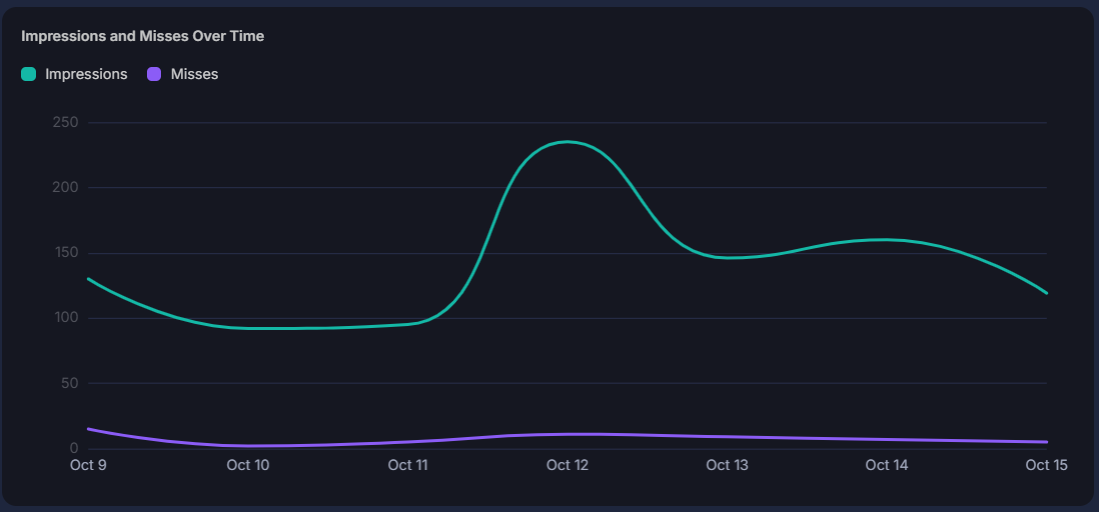
This graph shows two lines:
- Impressions: The number of validated visitor the number pool received, regardless of whether it had a number available. This number includes misses.
- Misses: The impressions where the pool had no available number so Ringba showed the default number instead.
Top 5 Pools by Misses
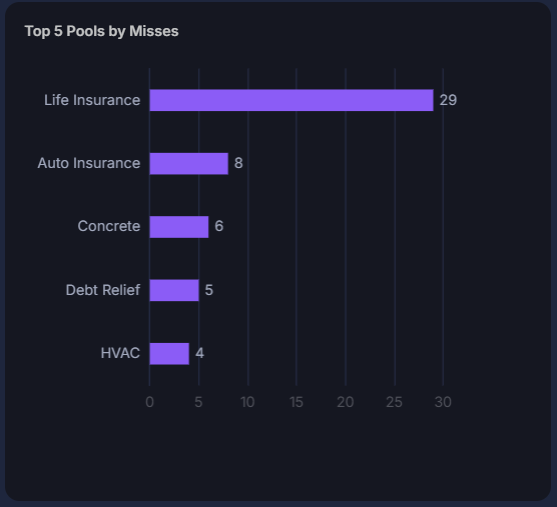
This list shows the five number pools in your account with the most misses during the date range you selected.
Number Pools Table
The Number Pools table contains rows of number pool data. The rows contain different data depending on which value you select in the grouped by field at the top of the screen.
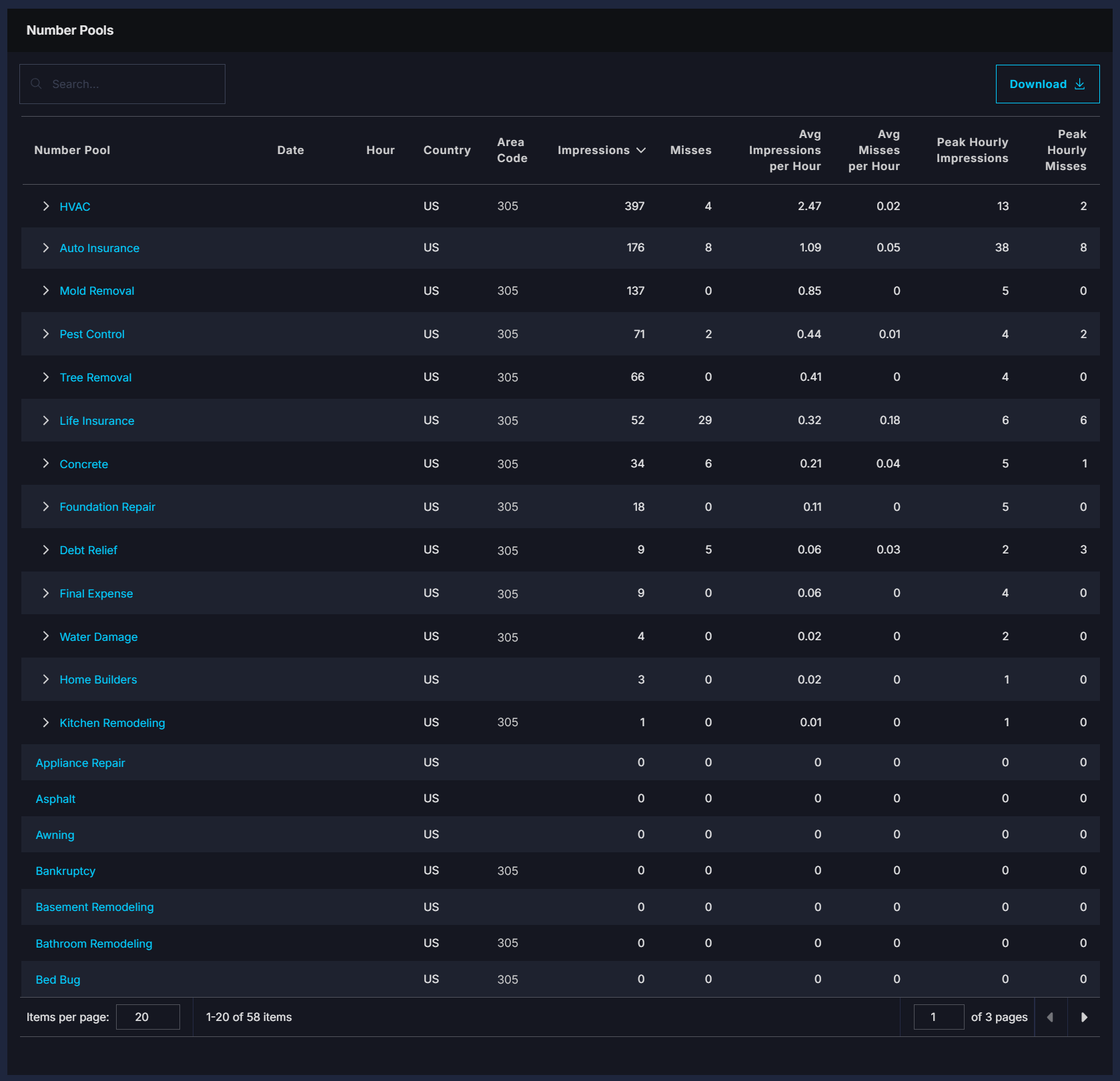
The table contains different columns based on whether you choose a group by value contains "Number Pool." It contains other values if you choose a group by value that contains "Date" or "Hour." If you choose Number Pool > Date, the table includes columns from both.
Group by value includes "Number Pool":
- Number Pool: The name of the number pool whose information appears in this column. Click the name to open the number pool in the Manage Pools screen.
- Country: The country of the numbers in this number pool.
- Area Code: The area code of the numbers in this number pool.
Group by date or hour:
- Date: The date whose information appears in this column.
- Hour: The hour whose information appears in this column.
Columns that appear in every report:
- Impressions: The number of validated visitors the number pool received, regardless of whether it had a number available. This number includes misses.
- Misses: The impressions where the pool had no available number so Ringba showed the default number instead.
- Avg Impressions per Hour: The number of Impressions divided by the number of hours the in this row.
- Avg Misses per Hour: The number of Misses divided by the number of hours in this row.
- Peak Hourly Impressions: The number of Impressions that occurred in the hour during the date range that had the most impressions.
- Peak Hourly Misses: The number of Misses that occurred in the hour during the date range that had the most misses.
Number Pool Summary FAQ
What should I do if I need help?
If you have any questions or need additional help, please reach out to our Support team via chat or email at support@ringba.com.