
The Outbound Ping HTTP Failures screen shows how the pings your account sends to ring tree targets (RTTs) are answered, across every target and every ping, over a date range you choose. It counts each ping's outcome by HTTP status so you can see which targets are failing and how often, without opening bid logs one at a time.
This feature is available to admin and report-only users. It is available in all Ringba subscription plans: Business, Professional, and Enterprise.
This article contains the following sections:
Outbound Ping HTTP Failures Screen
You navigate to the Outbound Ping HTTP Failures screen by clicking Insights > Outbound Ping HTTP Failures. Use the tools on the top right of the screen to choose the time zone and date range for the report. You can include up to 7 days (168 hours) from the last 30 days in the report.
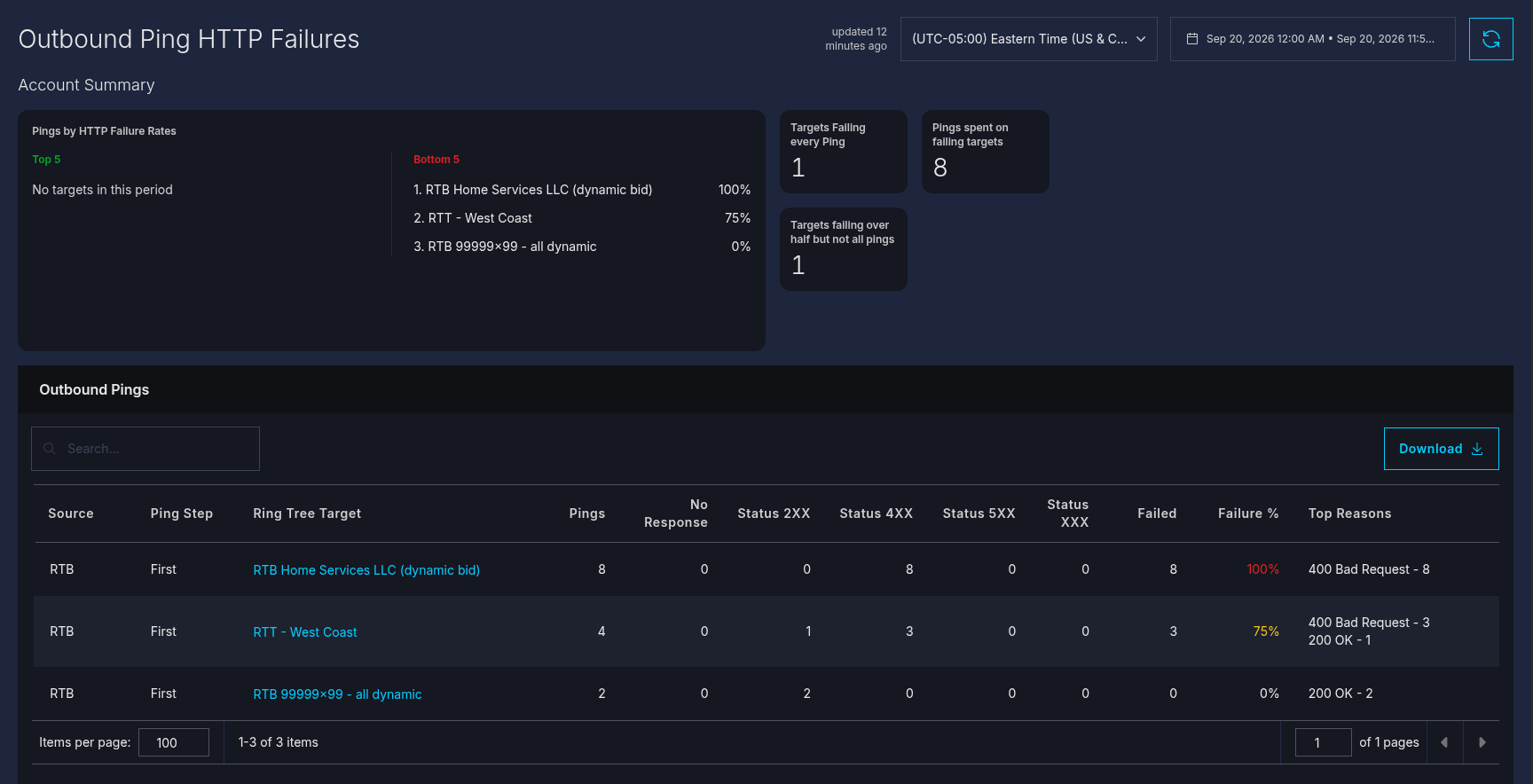
The screen contains an Account Summary at the top with sections for the top 5 and bottom 5 RTTs by HTTP failure rates. You also see the number of targets failing every ping, the pings spent on failing targets, the the targets failing over half but not all pings.
Below that, the Outbound Pings table appears with a row for each combination of Source, Ping Step, and Ring Tree Target within your chosen date range.
The table contains the following columns:
- Source: This column contains RTB if the pings were sent while bidding on an inbound RTB request or Call if they were send during a live call.
- Ping Step: Contains First if the ping was the initial request or Second if the ping was the confirmation sent to the winning target.
- Ring Tree Target: The RTT the pings were sent to. Click this column to open the ring tree target.
- No Response: The number of pings that received no response at all.
- Status 2XX: The number of pings the target answered with a status in the 200s, which is a successful status.
- Status 4XX: The number of pings the target answered with a status in the 400s, which indicates a client-error status.
- Status 5XX: The number of pings the target answered with a status in the 500s, which indicates a server-error status.
- Status XXX: The number of pings the target answered with any other status.
- Failed: The number of pings that returned a status other than in the 200s.
- Failure %: The percentage of pings that returned a status other than in the 200s.
- Top Reasons: The text of the most common message returned.
You can click the column headers to sort the table by the value in that field. Click the header again to reverse the sort, and click it a third time to remove the sort.
You can download a CSV of the data on this screen by clicking the Download button. Ringba downloads a CSV file to your browser's downloads folder with the same data you see in the Outbound Pings table.
How to Troubleshoot Outbound Ping HTTP Failures
Use the following steps to view outbound ping HTTP failures:
- Navigate to Insights > Outbound Ping HTTP Failures.
- Choose the date range you want to report on.
- Review the table for targets with high Status 4XX, Status 5XX, or Status XXX counts. These usually point to a problem with the target's endpoint.
- Check the Top Reasons column to see the status codes and reasons behind its counts.
- Click a target's name to open its settings if you need to fix or disable it.
Understanding How Ringba Counts Outbound Ping Failures
At this time, the counts on this view include all first pings (bid requests). When the value in the Source column is RTB, it means that the failures in the row came from a inbound bid request generated through an RTB campaign. Alternatively, when the Source column contains Call, that means the failures came through a static publisher DID.
Note: It is possible that the same RTT can have both sources. In this case, the table contains two rows, one for RTB and one for calls.
The report counts responses; it does not interpret them. A given status, such as 403 or 429, can mean different things depending on the target: what counts as a problem for one target may be routine for another. Use the status codes and reasons behind each row to judge whether a target needs attention.
This report only covers pings your account sends to its own ring tree targets.
Outbound Ping HTTP Failures FAQ
Why do I see the same ping counted under both RTB and Call?
When a bid you placed during RTB wins the call, that bid's ping is also recorded on the call, under Source: Call. Seeing the same ping reflected in both places is expected.
Does the report tell me what a status code means for a specific target?
No. The report shows the status code and reason the target returned, and how often, but it doesn't interpret what that status means for that target. Whether a given status is a problem depends on the target.
What should I do if I need help?
If you have any questions or need additional help, please reach out to our support team via chat or email at support@ringba.com.