
This article describes how you can control how Ringba routes a call from the same Caller ID as a previously connected or converted call for a particular target. You can also configure duplicate call routing at the buyer level.
Note: If you configure duplicate call restriction for both the buyer and the target, the settings on the buyer level apply by default and the settings for the target, if they exist, override the buyer settings.
Configuring Duplicate Call Routing
You configure how Ringba manages calls from the same caller ID as a previous call that connected to this target on the Targets > Manage Targets screen. Open the target you wan to configure and find the Restrict Duplicate Call Settings section to set the Restrict Duplicate field.
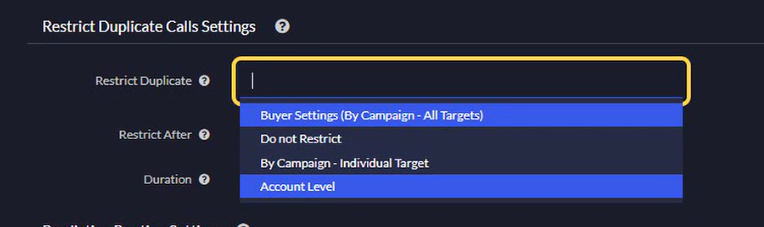
You can choose one of these options:
Buyer Settings
If you select this option, Ringba honors the settings you defined on this target's buyer. By default, all targets use the Buyer Settings and the setting appears in parentheses next to the option. In the example above, the buyer settings is (Do Not Restrict), but (Individual Targets) or (All Targets) can also appear here.
Do Not Restrict
If you select this option, this target overrides the setting on the buyer and does not restrict duplicate calls.
By Campaign - Individual Target
If you select this option, this target overrides the setting on the buyer and two other fields appear for you to configure the behavior: Restrict After and Duration.
- Restrict After: Choose how you want to define a duplicate call. Choose Converted to restrict calls from the same caller ID as a previously connected call that converted. Choose Connected to restrict calls form the same caller ID as a previously connected call.
-
Duration: Choose how long after the previous call to restrict subsequent calls from the same caller ID. If you choose Time Limit, a field appears for you to specify a number of days.
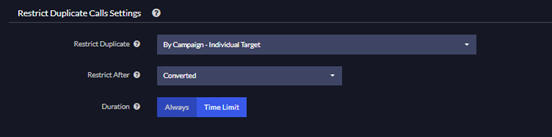
Note: You also have the ability to Restrict Duplicate Calls at the Buyer level. However, the setting you apply to at the target level override any settings at buyer level.
Account Level
This option works the same way as the By Campaign - Individual Target option except that Ringba considers calls that have previous calls that have come in through all campaigns in the account, not just the same campaign.
Restrict Duplicate Calls - Targets FAQ
What should I do if I need help?
If you have any questions or need additional help, please reach out to our support team via chat or email at support@ringba.com.