
Strike price lets you set a price threshold for specific hours of the week within a campaign. During bid collection, Ringba ends the auction immediately and declares a winner if it receives a bid that meets or exceeds that hour's strike price. It does not wait on the remaining ring tree targets (RTTs) to respond. Strike price applies to priority routing, predictive routing, and Real Time Bidding (RTB) bid-request-time resolution, so it can end bid collection early no matter which routing method the campaign uses.
This feature is available to admin users. It is available in all Ringba subscription plans, but you must have ring tree targets enabled in your account to use the functionality.
This article contains the following sections:
Strike Price Schedule Section
You create a strike price schedule in a campaign in the Strike Price Schedule section. Toggle on the Schedule switch to enable the schedule.
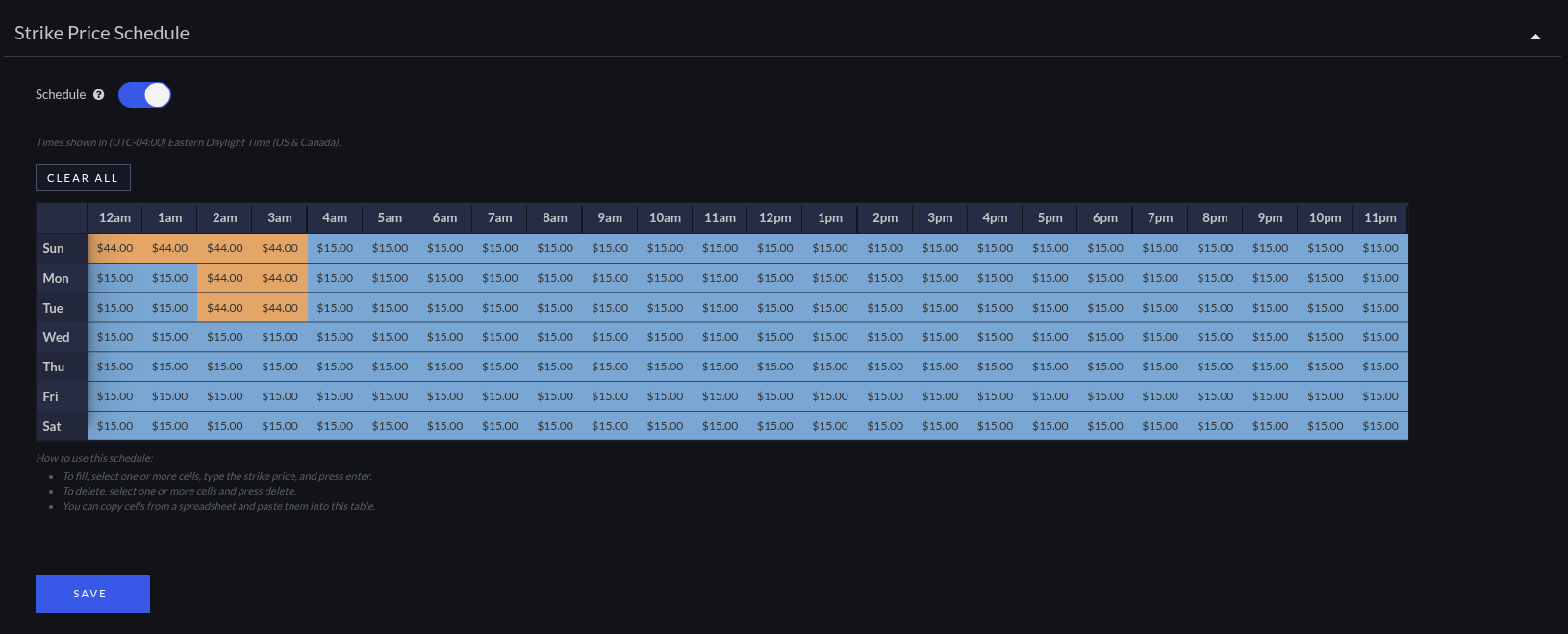
The strike price schedule shows hours of the day across the top and days of the week down the left side. Each cell holds the strike price for that day and hour. The times in the strike price schedule refer to your account's time zone.
Enter a price in any cell where you want bid collection to end as soon as a bid meets or exceeds that price. Leave a cell empty for any hour where you want the auction to run to completion as it does today.
How to Set a Strike Price
Use the following steps to set a strike price:
- Open the campaign where you want to configure the strike price and scroll to the Strike Price Schedule section.
- Toggle on the Schedule switch to show the schedule.
- Select one or more cells for the day and hour you want to set, enter the strike price, and press enter. Repeat for any other hours you want to configure.
Tip: You can copy cells out of a spreadsheet and paste them into the schedule. Try this if you want to set the same strike price schedule for multiple campaigns. - Click Save.
Understanding How Strike Price Affects Bid Collection
Without strike price, Ringba waits for every eligible ring tree target to respond or time out before choosing a bid. That wait can cost you calls: while the caller hears silence, or a publisher's ping stays open, some callers hang up before an acceptable bid ever comes back.
Strike price lets you decide, hour by hour and day by day, when a bid is good enough to accept right away rather than wait for a possibly better one.
When a call enters bid collection, Ringba checks whether the campaign has a strike price entry for the current hour. If it does, and an incoming bid meets or exceeds that price, Ringba stops collecting bids from the remaining ring tree targets. If there's no entry for the current hour, or no bid meets the strike price, the auction runs exactly as it would without strike price configured.
Strike price applies in all three contexts where Ringba collects bids: priority routing, predictive routing, and RTB bid-request-time resolution.
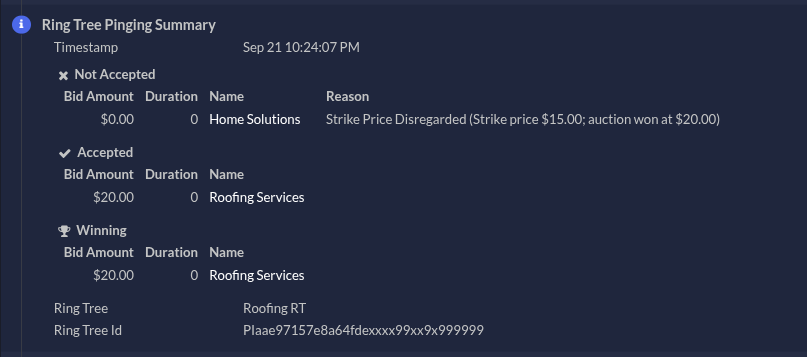
You can see the outcome of strike price in your bid logs, which show the bid that was accepted and the bids that were disregarded when a strike price ended the auction early.
Reviewing Bids in Reporting
As with all bid activity, you can see bids in campaigns with a strike price in the Events tab when you expand a call in the Call Details report.
Strike Price FAQ
Does strike price apply to priority and predictive routing, or only to RTB?
It applies to all three: priority routing, predictive routing, and RTB bid-request-time resolution. Any time Ringba collects bids from ring tree targets, strike price can end that collection early.
What happens if I don't set a strike price for an hour?
The auction runs exactly as it would without strike price. Ringba waits for every ring tree target to respond or time out before selecting a bid.
If I’m using predictive routing, does the strike price prevent the performance calculation?
If you enable a strike price alongside predictive routing, Ringba stops the auction as soon as a bid at or above the strike price is received. Ringba performs the performance calculation with whatever bids have been received at that point and chooses the best target, even if it’s not the one that met the strike price.
What should I do if I need help?
If you have any questions or need additional help, please reach out to our support team via chat or email at support@ringba.com.